
Customer Portals to Take Work Off Your Service Desk
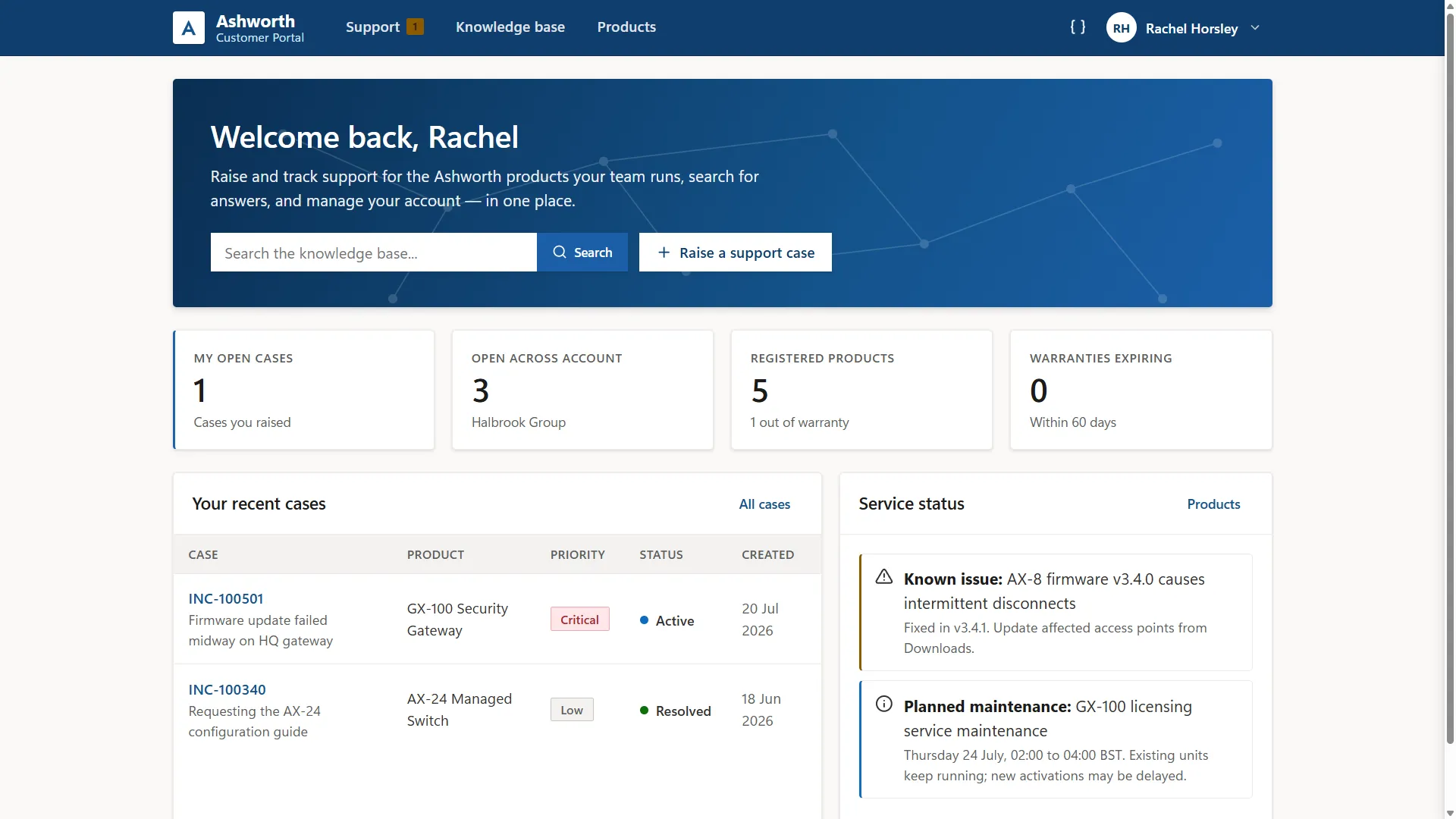
We are a UK Microsoft partner that builds customer web portals connected to Dynamics 365, giving customers one place to log cases, track progress, manage products and find answers. Every portal action comes back to the records you work from.
Reducing inbound service issues
Where has a case got to? Is a fault already reported as a known issue? What product support resources are available?
None of these questions should initially require a specialist, but they reach service desks when there is nowhere else to check.
A portal connected to Dynamics 365 gives customers that route directly. Case statuses, entitlement terms and knowledge articles come straight from the centralised records service teams use, immediately updated when something changes.
What a customer portal changes
Fewer repeat
questions
Case status, contract cover and documents are online, so teams engage customers when it matters.
Faster first
response
Cases arrive with products, serial numbers and entitlements attached, enabling instant triage.
Service levels
made visible
SLA commitments in Dynamics are visible to customers, showing priority and response times.
A record that
stays current
Customers can manage account information online and keep it updated, improving data quality.
See a working portal before you commit
The example support portal below runs on sample data, allowing you to create a case, search the knowledge base, open registered products and update account information.
We can build a similar personalised prototype that lets you preview your portal before you commit. We take your processes, your terminology and scenarios, then present a working example you can test.
Functions we build into customer portals
Every service operation runs differently, so we will configure the portal to fit yours. Built by our developers and shaped with experienced consultants, these capabilities include:
-
Case logging and tracking
Customers raise cases online, add updates and attachments, and follow progress on each one without emailing for news.
-
Knowledge base
Published articles are promoted when customers describe a problem, so routine questions can be deflected before cases are created.
-
Registered products and assets
Serial numbers, install dates and warranty status are held on the customer record, so conversations start with the right product already identified.
-
Entitlements and service levels
Customers see the cover they hold, what capacity remains and the response targets that apply, drawn from Dynamics 365 Customer Service.
-
Service status and notices
Planned maintenance and live incidents are published once and reach everyone, cutting the wave of calls that follows an outage.
-
Documents and downloads
Manuals, firmware, certificates and reports can be held against each registered product, with access set by what each customer owns.
-
Account team access
Primary contacts can add colleagues and control what each can see, with a shared view of every case raised across their organisation.
-
AI assistance
AI agents working inside an authenticated user's permissions can summarise live cases, offer inline guidance through forms, and extract data from uploaded documents.
Why choose The Portal Company
- ★We specialise in creating tailored portals using connected Microsoft technology.
- ★Proven expertise in building websites that integrate with key systems and data sources.
- ★ We reduce risk by demonstrating a portal prototype before you commit.
- ★ Senior developers with 15+ years of Dynamics 365 and portal experience.
- ★ No offshore teams - we offer UK-based consultants and developers.








Our Microsoft portals expertise
We use Microsoft technology to create secure, data-powered websites that modernise processes and delight end users. Our portals are built using products that include:

Power Pages
Customising adaptable templates to specific portal requirements while ensuring functionality and design finesse.

Azure Blazor Apps
Offering vast customisation options for sophisticated portals, ensuring scalability, security, and comprehensive integration.

Power Automate
Increasing scale and efficiency by triggering automated actions in response to portal interactions.

Dynamics 365
Seamlessly integrating business processes between portals and Dynamics CRM, including cases, leads, contracts, and more.

Power Apps
Connecting processes managed in other business apps with your portal, such as subscriptions, events, and registrations.

Power BI
Enhancing self-service portals with dynamic, interactive data visualisations that offer insightful analytics.
Website Integrations
We use Microsoft cloud technology to connect portals with CRM, ERP, and other systems and third-party services to integrate data, automate processes, and simplify operations. These examples include:









Customer Portals: Frequently Asked Questions
Discuss Your Project?
Tell us what you want your customer portal to achieve. We will show you a working demonstration portal, and if it fits, build a prototype with your own processes in it before you commit to a project.