
Facilities management portals that show your work
Your customers want proof of what you deliver to their sites, whenever they ask. We build customer portals on your Dynamics 365 data, so estates teams, site managers and building occupiers can sign in, raise requests and check the work done at each site.
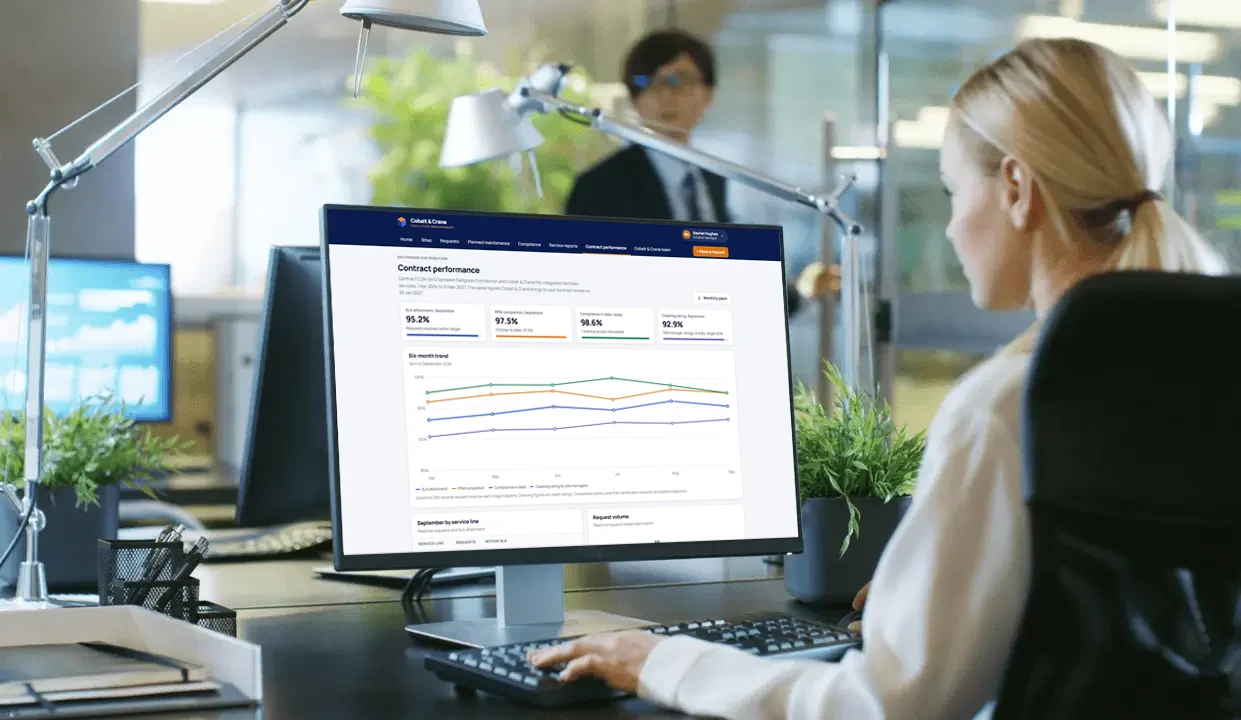
One record both sides can trust
A portal gives your customers the same view of every contract, drawn from the data your team already tracks. Customers see where things stand across their sites, and your account managers prepare reviews from figures already published.
Every number in the portal traces back to a record your customer can check. Job times come from your engineers’ apps, sign-offs from their own site managers, and certificates from the firm that carried out each test.
Why choose The Portal Company
- ★ See a working portal prototype before any commitment.
- ★ We specialise in creating tailored portals using connected Microsoft technology.
- ★ Proven expertise in building websites that integrate with key systems and data sources.
- ★ Senior developers with 15+ years of Dynamics 365 and portals experience.
- ★ UK-based consultants and developers, from scoping to support.
Try a facilities management portal
The example below uses sample data for a fictitious FM company whose customer has eight distribution sites. Switch between an estates manager and a site manager to see what each role can view and do.
It shows one way an FM portal can work. Other FM portals let building occupiers report faults, assign jobs to subcontractors, upload certificates or take a new customer through mobilisation. From an initial discussion, we’ll build a personalised prototype around your services.
What changes for your business
Win Tenders
Show buyers the reporting and data access behind your work.
Retain contracts
Start renewal talks from results your customer has tracked all year.
Fewer calls
Online resources answer questions before anyone calls your helpdesk.
Clearer requests
Requests arrive with site, asset, priority and photos attached.
Our Microsoft portals expertise
We use Microsoft technology to create secure, data-powered websites that modernise processes and delight end users. Our portals are built using products that include:

Power Pages
Customising adaptable templates to specific portal requirements while ensuring functionality and design finesse.

Azure Blazor Apps
Offering vast customisation options for sophisticated portals, ensuring scalability, security, and comprehensive integration.

Power Automate
Increasing scale and efficiency by triggering automated actions in response to portal interactions.

Dynamics 365
Connecting portals to Dynamics 365, so cases, leads, contacts, applications and other records update as people interact.

Power Apps
Connecting processes managed in other business apps with your portal, such as subscriptions, events, and registrations.

Power BI
Enhancing self-service portals with dynamic, interactive data visualisations that offer insightful analytics.
Functions we build into FM portals
Each FM provider runs contracts differently, so we will configure a portal around your service lines, response targets and the way each estate is organised. Capabilities can include:
| Area | Capabilities |
|---|---|
| Contract performance | Monthly results against each contract target, a breakdown by service line and a performance pack to download. |
| Security and soft services | Incident reports with photos and outcomes, patrol check-ins, alarm responses, waste collections and cleaning logs by site. |
| Estate and account | All sites on one map with their open issues, a Copilot summary of recent activity, and a contact for every site. |
| Planned and statutory | A maintenance calendar by site and asset, statutory test status with certificates to download, and audit packs by site. |
| Reactive requests | Fault reports showing response time before submission, a prompt to phone for emergencies, and before-and-after photos. |
| Quotes and mobilisation | Online approval of quotes for remedial and extra works, and one place to gather site details and asset lists for new contracts. |







Facilities management portal FAQs
Preview your portal before you commit
Tell us what your customers ask you for most. We’ll build a prototype around those requests so you can see it working.