Dealer portals to grow sales through your network
We are a UK Microsoft partner that builds dealer portals connected to Dynamics 365 and SharePoint. Dealers and distributors have one place for product information, marketing content, launch details and warranty claims, with every action updated in your systems.
Give dealers one place to find what they need
Dealers lose time when product information, price lists, images and technical specifications sit across emails, shared drives and individual contacts. When a file is missing or out of date, they’ll ask head office or reuse what they used last time. Your team fields the same requests, and customers see outdated product details on dealer websites and in proposals.
A dealer portal puts approved content and everyday requests behind a single secure sign-in. Your team keeps publishing as it does now, and each authorised dealer sees the latest content.
What a dealer portal changes
Fewer requests reach your team
Dealers can find files, request samples, and make claims on their own. So your sales and service teams focus on what matters most.
Dealers sell from current information
Product descriptions, images, specs and prices sync from one source, ensuring dealer content aligns with your latest ranges.
Faster starts for new dealers
Their staff access training courses, product files and launch material from their first login, and you can track certifications online.
See how your network uses content
Understand which products, files and launches each dealer engages with, a clear signal of which dealers need more support.
Functions we build into dealer portals
Every dealer network works differently, so we shape each portal around your products, dealer tiers, internal systems and day-to-day processes. Capabilities can include:
| Area | Capabilities |
|---|---|
| Specify and sell | Current product data, specifications and files served from SharePoint, pricing shown by dealer, consumer leads passed to the nearest dealer, and an AI assistant answering dealer questions from your documents. |
| Market and launch | The latest approved images, brochures and co-branded templates, embargoed launch materials with NDA terms that release to every dealer at once, and dealer announcements. |
| Order and account | Order status, delivery dates and stock availability drawn from your ERP, with each dealer seeing only its own orders, contacts and account details. |
| Service and support | Warranty registration and pre-delivery inspection records at handover, claims with serial numbers and photos, parts and service information, support cases, and training and certification records for each dealer's staff. |
If your channel partners register deals and referrals, see our partner portals.
Try a working dealer portal
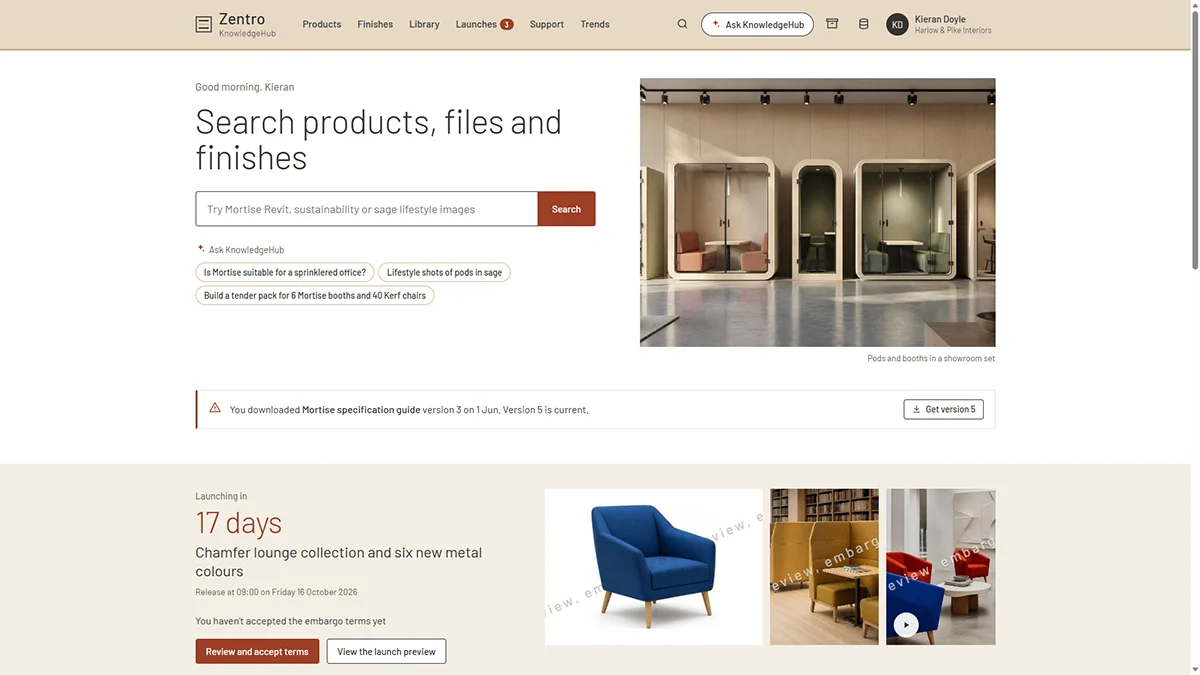
The example below is a knowledge and marketing hub for dealers at a fictitious furniture manufacturer, running on sample data. Switch between a dealer principal, a designer and a marketing manager to see how access changes for each role.
You can search the library, download content, request samples and accept terms for a new product launch.
It shows one part of what a dealer portal can do. From an initial discussion, we’ll build a prototype website to fit your processes and network.
Why choose The Portal Company
- ★ See a working portal prototype before you buy.
- ★ We specialise in creating tailored portals using connected Microsoft technology.
- ★ Proven expertise in building websites that integrate with key systems and data sources.
- ★ Senior developers with 15+ years of Dynamics 365 and portals experience.
- ★ No offshore teams – we offer UK-based consultants and developers.








Our Microsoft portals expertise
We use Microsoft technology to create secure, data-powered websites that modernise processes and delight end users. Our portals are built using products that include:

Power Pages
Customising adaptable templates to specific portal requirements while ensuring functionality and design finesse.

Azure Blazor Apps
Offering vast customisation options for sophisticated portals, ensuring scalability, security, and comprehensive integration.

Power Automate
Increasing scale and efficiency by triggering automated actions in response to portal interactions.

Dynamics 365
Seamlessly integrating business processes between portals and Dynamics CRM, including cases, leads, contracts, and more.

Power Apps
Connecting processes managed in other business apps with your portal, such as subscriptions, events, and registrations.

Power BI
Enhancing self-service portals with dynamic, interactive data visualisations that offer insightful analytics.
Website Integrations
We use Microsoft cloud technology to connect portals with CRM, ERP, and other systems and third-party services to integrate data, automate processes, and simplify operations. These examples include: